How to Check a Rummy App’s Permission Requests
An app may ask for permissions during installation or first launch, but a request is not automatically justified because the app displays a game. Reviewing permissions is a simple privacy check that can reveal unnecessary access.
Start with the purpose of the app. A rummy service may reasonably need network access to connect to a table and notifications if you want turn alerts. It may not need access to contacts, text messages, a microphone, or precise location for ordinary card play. The correct answer depends on the service, but unrelated requests deserve a question before approval.
Read the permission explanation and the device-level prompt separately. Marketing language can be broad, while the system prompt tells you what access is actually being requested. If the explanation is vague, decline the permission and see whether the core app still works. A refusal that prevents basic use is information you can weigh before continuing.
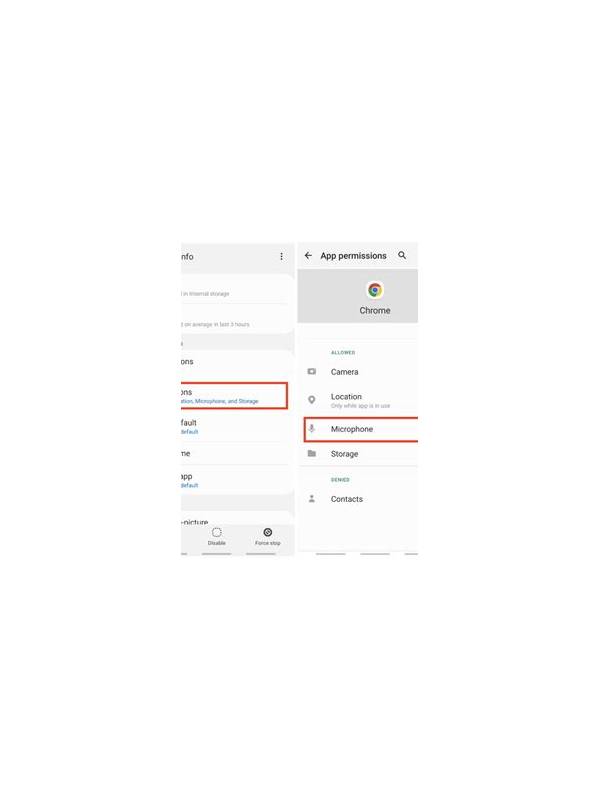
Check permissions after installation as well. Updates can introduce new requests, and settings can show whether access is currently allowed, denied, or limited. Revoke anything you do not need. On some devices, you can allow access only while an app is in use; choose the narrowest setting that supports a feature you actively use.
Be careful with accessibility, device administration, and notification-reading access. These controls can be powerful and should not be granted casually. A game does not become more trustworthy because it presents a professional-looking screen. If an installation requires disabling security protections or downloading from an unknown source, stop and verify the provider independently.
Use the official store listing when possible, check the developer name, and compare the requested permissions with the app’s stated features. Reviews can provide clues, but they are not proof of safety. Avoid copying a package from a chat attachment or a shortened link.
Permissions are only one part of a safety review. Also read the privacy policy, use a unique password, and keep spending within a fixed limit. If an app insists on broad access for a simple game, choose not to install it until you understand why. Your device should support your play, not quietly expose unrelated personal data.
Recheck after major updates or when the app changes ownership. A permission that seemed optional may become necessary for a new feature, but you still have the right to decline it. If declining breaks a feature you do not need, keep it disabled. If the app stops functioning without an unrelated permission, consider that a reason to find a different service.
Privacy choices should remain under your control.